The screenshot that sent me into Duckpad’s docs this morning is a dialog titled “How this value was calculated”. It takes one cell, a revenue figure of 7,131 for the South region, and lays out five of the order amounts behind it (99, 247, 395, 68 and 364) with a pager reading 1–5 of 27 contributions.
That dialog answers the question anyone who writes reporting SQL gets asked eventually, which is where a particular number came from. Explaining the query is easy. Explaining one value in its output is a different job, usually done in a scratch tab full of WHERE order_id = ... filters. The result is correct until someone asks.
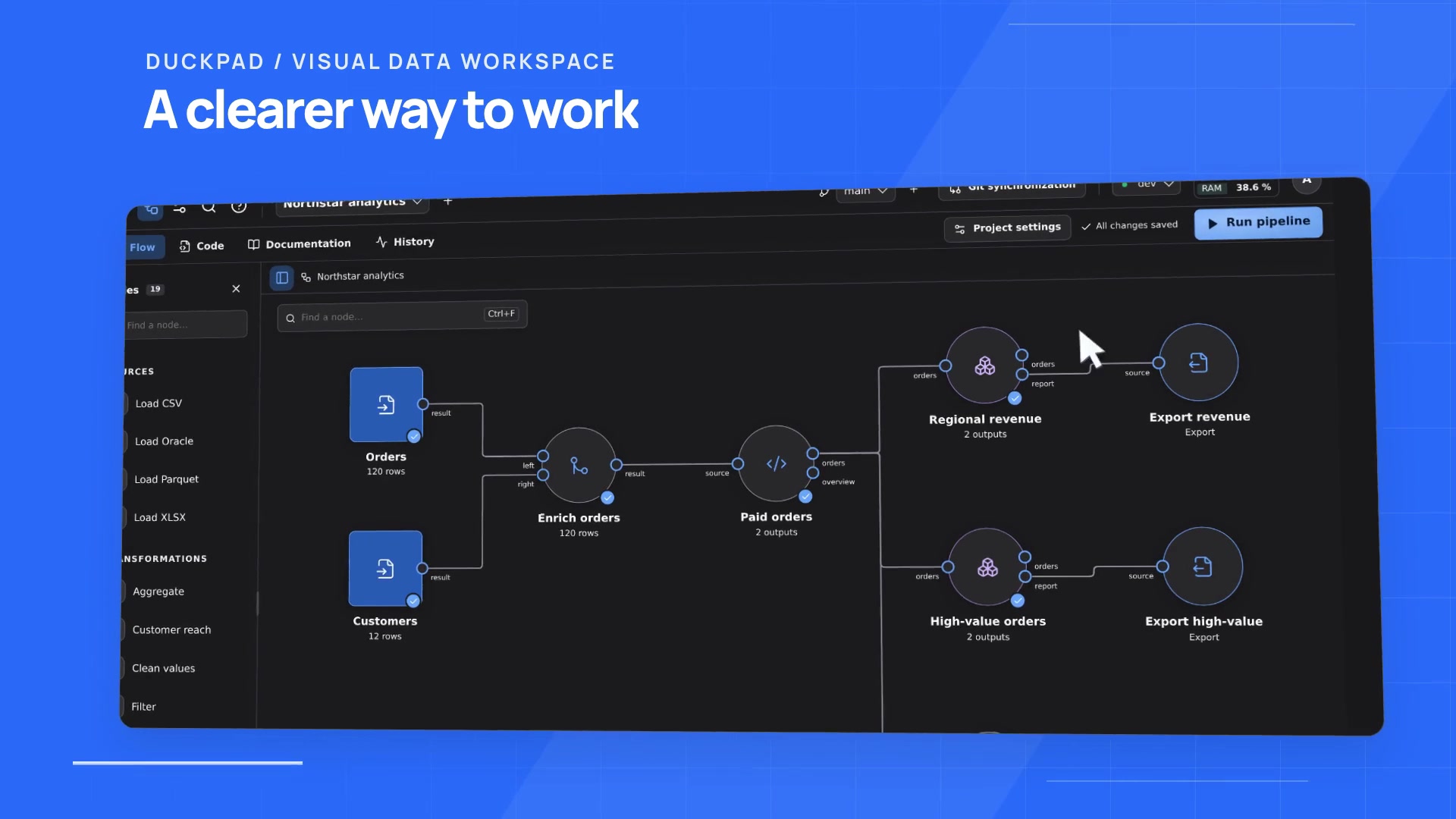
Duckpad is an open-source SQL workspace built on DuckDB 2.0. It ships as a Python package with a bundled web interface: you wire sources, joins and SQL steps into a pipeline on a canvas, run it, then click any result cell to see the source values and calculations that produced it. Projects are versioned in Git with branches and a reviewed merge step, and it runs on your own machine or server under the MIT licence.
I’ll admit the name misled me. “Duckpad” sounded like a scratchpad, a nicer DuckDB prompt in a browser tab. It’s nothing of the sort. There’s an admin account, per-project reader, editor and admin roles, OIDC single sign-on, per-account SSH keys for Git remotes, and Linux sandboxing for the SQL workers. It’s a small team server that happens to start with one command. I’ve been through the docs and a good chunk of the 12,600 lines of Python; I haven’t put my own data through it yet.
Why lineage is worth the trouble
The honest objection is that lineage is a box people tick on a procurement form and never open. A column-level graph tells you net_revenue depends on orders.amount and refunds.amount. That’s true, and almost no help when one cell in row 412 looks wrong.
Duckpad goes a level further down. The answer isn’t “this column depends on those columns” but “this value came from these 27 rows, and here’s the sum.” That’s what a sceptical colleague actually wants to see.
The part I find interesting: witnesses
The design decision that makes this work is described in docs/ARCHITECTURE.md. When a node runs, the public view you query contains exactly the columns your SQL produced. Alongside it, a private table holds a stable identity for every output row and, where it’s safe, hidden “witness” columns recording which input rows contributed, or the grouping keys behind an aggregate. Your SQL is parsed with SQLGlot, and the trace/ package uses one visitor per SQL construct to build a targeted provenance query against those retained tables when you click a cell.
Two things follow. Lineage explains the run, not today’s data. If the source CSV changed afterwards, the explanation still points at what was materialised, which is the right call. And pass-through detection works on the parsed expression rather than on equal values, so amount * 1 still shows up as a calculation step even though the output matches the input.
Calculation cards bind the captured operands into the expression:
# How a lineage card renders a projected cell (example from docs/LINEAGE.md)
amount * 2      # the expression in your SQL
10 * 2 = 20     # the same expression with the captured operand bound in
When tracing hits something it can’t explain, the API returns complete: false with the unsupported step named, and the UI shows a coverage warning. A “native-equivalence” test suite checks instrumented results against plain DuckDB, so the witnesses shouldn’t change your answer.
That last part is what I’d want from any provenance tool. Say where coverage stops.
Running it
You need Python 3.11+ and Git on your PATH.
pip install duckpad
duckpad start    # prints a localhost URL and a one-time admin password

# separate instance directory, fixed port, no browser launch
duckpad start --home /path/to/my-instance --port 8765 --no-browser

# single trusted user on Windows: disables the SQL sandbox for this launch only
duckpad start --trusted-local
The server binds to 127.0.0.1 and keeps accounts, connections and run history in ~/.local/share/duckpad, outside your project repositories. Sign-in is throttled to 12 attempts per minute per client address, which bites behind a reverse proxy: without FORWARDED_ALLOW_IPS set to the proxy’s address, every user looks like the proxy, and 12 typos lock everyone out. Results live in memory, so after a restart previews and lineage need a fresh run.
Caveats, honestly
It’s six days old. The first commit landed on 25 October 2026, four days after DuckDB 2.0.0 shipped. There are more than 400 commits and eight tagged releases, v0.1.0 to v0.8.0, between 26 and 30 October, and the PyPI classifier says Alpha. The install guide already documents an older instance schema that isn’t migrated: startup exits and asks you for a fresh --home.
Much of the work runs through an agent pipeline. AGENTS.md describes a branch-per-issue workflow driven through Multica, and 61 commits are titled “chore(agent): baseline”. Merges need explicit human approval, but the issue workflow lives in private tooling, so you can’t browse much of the backlog.
The sandbox is Linux-only. Isolated SQL needs Landlock ABI 2 or later (Linux 5.19+). The docs offer --trusted-local for Windows and don’t say what macOS users should do. In that mode SQL runs with your OS permissions, and project roles stop being a filesystem boundary.
The instance directory holds everything worth stealing. Connection secrets and every account’s Git SSH private key sit there. The folder gets owner-only permissions, and the SSO guide states plainly that the database isn’t encrypted at rest, so treat it as a secret and keep it off shared drives. Read access also isn’t an extraction control; readers can copy whatever they can see.
UNION ALL isn’t traced. Duplicate-occurrence assignment isn’t implemented for UNION ALL, INTERSECT ALL or EXCEPT ALL, and recursive CTEs, QUALIFY, ROLLUP and CUBE are also outside the baseline. Those queries still run, with a warning instead of lineage, and anyone stitching monthly exports together with UNION ALL will see that warning a lot.
It doesn’t schedule anything. Every run is manual. The architecture doc says schedules, webhooks and retries aren’t in the MVP.
If you need a nightly production pipeline, or a shared, isolated instance for a team on Macs, this isn’t for you yet.
Where it sits next to dbt
| Duckpad | dbt Core | |
|---|---|---|
| Best at | Explaining one suspicious value, visually, against the exact run that produced it | SQL models in your own editor, with tests, docs and years of adapters behind it |
| Falls down on | Scheduling, isolation off Linux, and SQL outside its lineage baseline | Saying where a specific number came from; its lineage is about models and columns, not values |
What I’d steal
The witness pattern. Even if Duckpad never runs in production for me, storing a row identity and its contributing input keys next to every materialised result, then answering “where did this come from” with a targeted query later, is something I could add to my own reporting tables with a couple of extra columns. Explaining a number should be a lookup, not a scratch tab.